User Guide
Welcome, and thank you for your interest in Coreform IGA for Abaqus!
This guide explains what immersed isogeometric analysis is, how Coreform IGA fits into the Abaqus workflow, and how to install, configure, and use the product.
In this guide
Start here
Installation and configuration
Download and install Coreform IGA for Abaqus, prepare Abaqus 2026 Hot Fix 5 (HF5), and configure product licensing.
Immersed IGA overview
Learn how trimmed solid elements use spline-based approximation on a non-body-fitted background discretization.
Workflow overview
See how model setup, mesh generation, Abaqus execution, IGA user elements, and postprocessing fit together.
Current capabilities and limitations
Understand the currently supported Abaqus workflows and the limitations that apply to IGA user elements.
Using Coreform IGA in Abaqus/CAE
Launch the Coreform IGA for Abaqus custom application and learn where its tools appear in the Abaqus/CAE interface.
Roadmap
Review Coreform’s current plans and priorities for upcoming Coreform IGA releases.
Release notes
Review the changes included in each Coreform IGA for Abaqus release.
Scripting Guide
Learn how to run scripts and use Probes, Meshes, Jobs, and portable Coreform specifications in complete workflows.
Scripting Reference
Look up exact object paths, signatures, parameters, return values, attributes, and exceptions for the public Python API.
Goals and audience
This manual has been written with the following goals and assumptions:
Goals — have the reader understand:
- What isogeometric analysis (IGA) is.
- The benefits and limitations of IGA compared to FEA.
- How to use Coreform IGA for Abaqus inside Abaqus/CAE.
Assumptions:
- The user has never used IGA.
- The user has at least a beginning working knowledge of how to use Abaqus/CAE.
1 How Coreform IGA is integrated into Abaqus
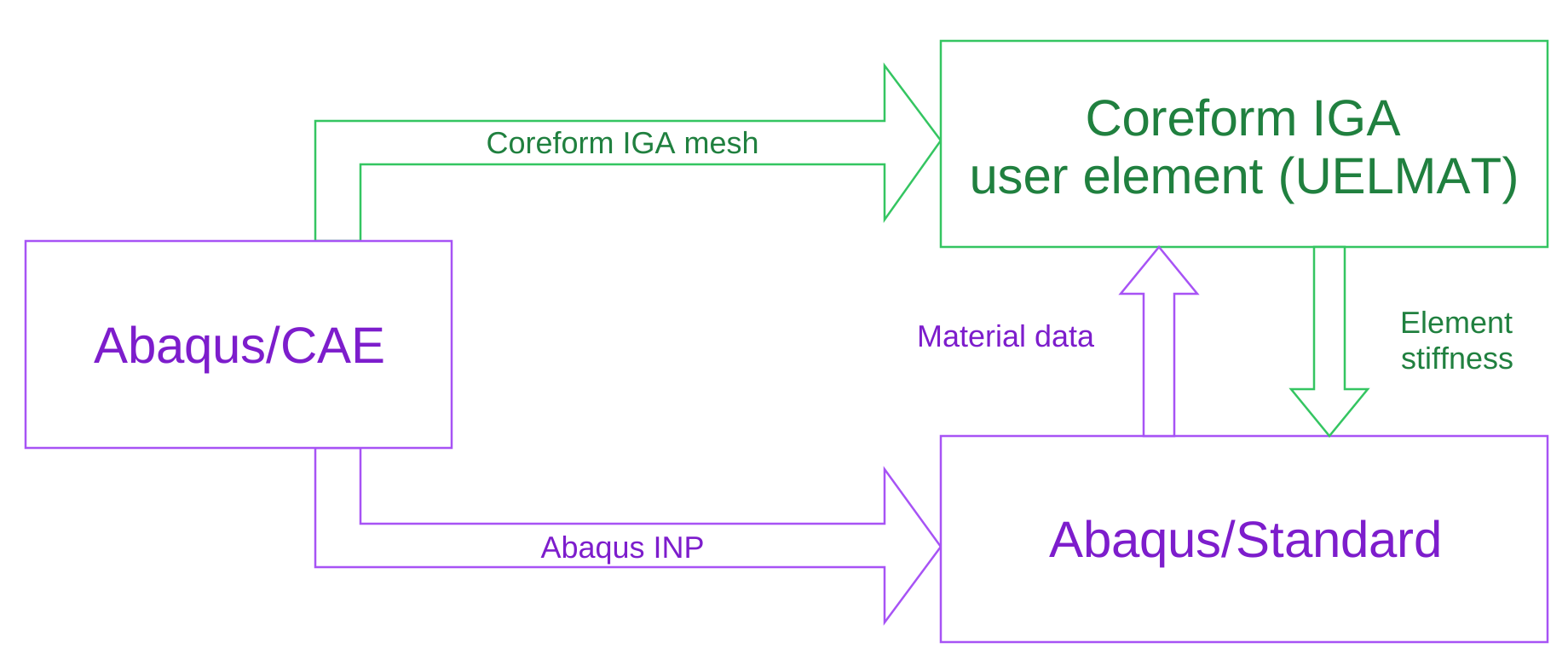
Coreform IGA for Abaqus integrates directly into the standard Abaqus workflow through Abaqus user elements, as shown in Figure 1. Model setup, including geometry, materials, and boundary conditions, is still done in Abaqus/CAE. From there, two things are generated: a standard Abaqus INP file, and a Coreform IGA mesh, which together define a Coreform IGA user element (UELMAT).
During the analysis, Abaqus/Standard and the Coreform IGA user element exchange data at each iteration: Abaqus/Standard passes material data to the user element, which returns the corresponding element stiffness. This tight coupling allows Abaqus/Standard to solve models containing IGA-meshed parts using its native solver, with Coreform supplying the spline-based element behavior.
2 How Coreform IGA for Abaqus can be useful for you
Coreform IGA for Abaqus is most useful when geometry, not physics alone, is the bottleneck in your analysis. Assemblies with parts with many ribs, fillets, bolted connections, or other fine features; thin-walled or flexible components; and castings or 3D-printed parts with intricate detail are all cases where building a good hex or tet mesh is slow or simply fails. Because Coreform IGA analyzes the CAD model directly rather than a defeatured, meshed approximation, it removes the model-prep step that normally consumes the most analyst time on these kinds of parts.
This matters most when that geometry also carries demanding physics: nonlinear material behavior, large deformation, contact, or thin-wall bending, where a coarse or defeatured mesh would compromise the result. Analysts in aerospace, automotive, and electronics are early users specifically because their parts combine this kind of geometric complexity with nonlinear analysis requirements.
Just as important is what doesn’t change: analyses still run in Abaqus/Standard, so adopting Coreform IGA doesn’t mean learning a new solver or re-validating existing methods. For teams whose current bottleneck is defeaturing and meshing rather than the solve itself, this is where Coreform IGA for Abaqus offers the most direct benefit.
3 Technical support
For technical support, please default to posting all questions to our forum under the Coreform IGA for Abaqus category. For questions regarding proprietary projects, reach out to your primary Coreform point of contact via email.